

Download Flixster – Free Movie Info, Trailers & Showtimes
Overview
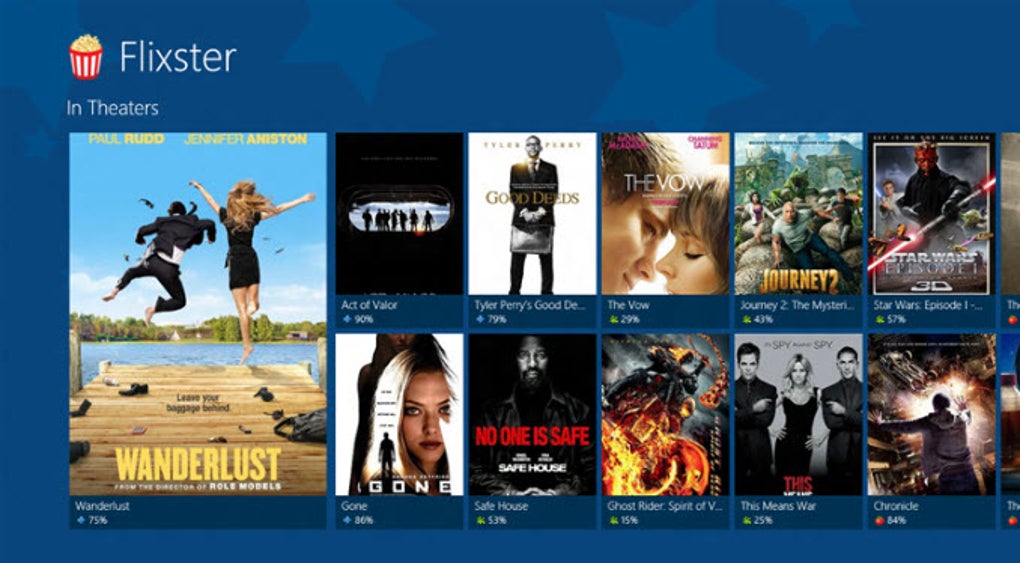
Flixster brings the excitement of the cinema right to your Windows 8 desktop. Designed specifically for the Metro interface, this free app acts as a one‑stop hub for everything a movie lover might need: detailed synopses, high‑definition trailers, critic scores from Rotten Tomatoes, community reviews from Flixster’s own users, and up‑to‑date showtimes for theaters near you. The sleek, tile‑based layout mirrors the modern Windows 8 aesthetic, making navigation feel natural whether you’re scrolling horizontally across the bottom bar or tapping directly into a film’s dedicated page.
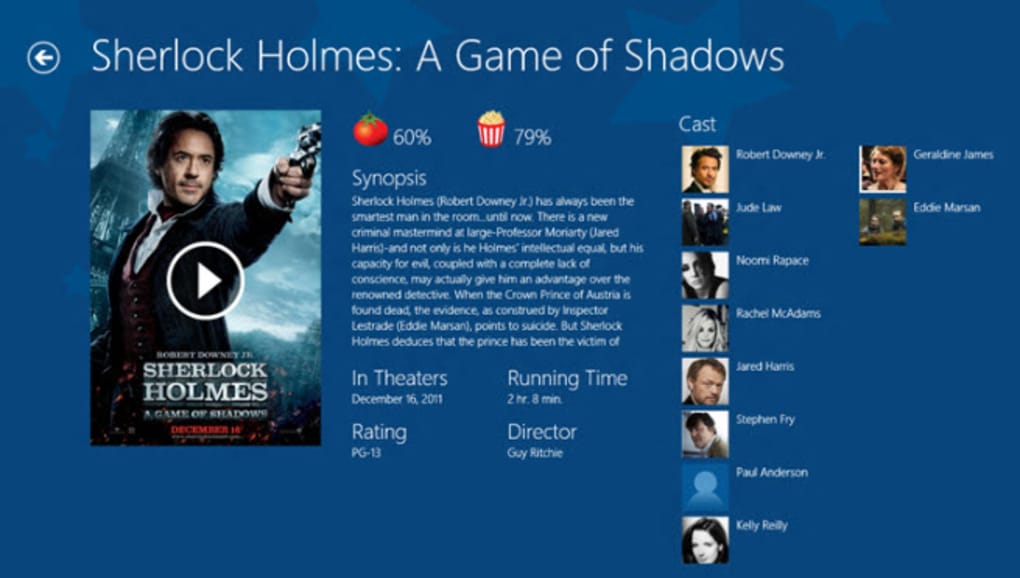
Each movie entry showcases a crisp poster, a clickable thumbnail that launches the trailer, and a concise cast list with actor icons for quick reference. For casual viewers, Flixster offers a rapid “What’s on tonight?” snapshot, while power users can deep‑dive into a film’s production details, explore related titles, and even add movies to a personal watchlist. The app’s integration with the Windows Store ensures automatic updates, keeping your movie database fresh without manual intervention.
While the installation process may present a minor hiccup for some first‑time users, the overall experience is polished, secure, and packed with value—making Flixster a must‑have tool for anyone who enjoys staying informed about the latest releases and classic favorites alike.
Key Features
- High‑Resolution Trailers: Stream official trailers in HD directly from the movie’s page.
- Rotten Tomatoes Integration: View critic scores, audience ratings, and consensus summaries side‑by‑side.
- Community Reviews: Read and contribute personal reviews from the Flixster user base.
- Showtime Finder: Locate nearby theaters, filter by time, and see real‑time ticket availability.
- Movie Synopsis & Cast: Access concise plot summaries, detailed cast lists, and actor photos.
- Personal Watchlist: Bookmark movies you plan to see and receive reminder notifications.
- Metro‑Optimized UI: Horizontal scrolling, live tiles, and touch‑friendly controls designed for Windows 8.
- Automatic Updates: Seamlessly receive the latest movie data and app improvements via the Windows Store.
- Secure & Free: No hidden fees, no adware, and data transmission is encrypted for privacy.
Installation, Usage & Compatibility
Getting Flixster up and running on your Windows 8 device is straightforward, but a few best‑practice steps can smooth out the occasional first‑time hiccup. Open the Windows Store, search for “Flixster,” and click the Get button. The app will download automatically; once the progress bar completes, select Launch. If you encounter an “Installation failed” message, ensure your system is running the latest Windows 8 update and that you have sufficient free disk space (the app occupies roughly 120 MB). A quick restart of the Store app often resolves the issue.
Upon launch, Flixster greets you with a tiled homepage displaying currently popular movies and a quick‑access “Now Showing” carousel. Tap any tile to open the movie’s detail page, where you’ll find the trailer thumbnail at the top, followed by the Rotten Tomatoes rating, a brief synopsis, and a cast grid. To watch a trailer, simply tap the play button; the video streams in a full‑screen overlay without leaving the app. Showtimes are accessed via the “Find Showtimes” button, which uses your device’s location (you’ll be prompted to enable location services). A list of nearby theaters appears, each with showtime options and a direct link to the theater’s ticketing page.
Flixster is built exclusively for the Windows 8 Metro environment, meaning it runs natively on both 32‑bit and 64‑bit editions of the operating system. While the app does not currently support Windows 10 or mobile platforms, its design leverages the live‑tile functionality that many Windows users appreciate. For power users, the settings menu offers options to toggle notifications, clear the watchlist, and adjust video quality (auto, 720p, or 1080p). Because the app is free, there are no hidden subscription fees, and all data exchanges are encrypted via HTTPS, ensuring a secure browsing experience.
Pros, Cons, FAQ & Final Thoughts
Pros
- Beautiful Metro‑style UI that feels native to Windows 8.
- Comprehensive movie data—including trailers, critic scores, and community reviews.
- Fast showtime lookup with location‑based results.
- Free, ad‑free, and regularly updated through the Windows Store.
- Secure HTTPS connections protect user privacy.
Cons
- Installation can be finicky on first attempt for some users.
- No Windows 10 or mobile version available yet.
- Limited customization of the UI beyond default Metro tiles.
- Showtime data depends on third‑party theater feeds, which may occasionally be outdated.
Frequently Asked Questions
Is Flixster completely free to use?
Yes, Flixster is a free application. There are no hidden charges, subscription fees, or in‑app purchases. All features—including trailers, reviews, and showtime searches—are available at no cost.
Can I watch trailers without an internet connection?
Trailers are streamed online, so an active internet connection is required. However, you can download a trailer manually via the Windows Store’s offline feature if you anticipate limited connectivity.
How often is the movie database updated?
Flixster syncs with its servers daily. New releases, updated critic scores, and fresh showtime listings appear automatically thanks to the app’s background update mechanism.
Will Flixster work on Windows 10?
Currently, Flixster is optimized for Windows 8 Metro and may not install on Windows 10. The development team has hinted at a future Windows 10 version, but no release date has been announced.
How does Flixster protect my personal data?
All communication between the app and Flixster’s servers uses HTTPS encryption. The app does not collect personal identifiers beyond optional location data, which you can disable at any time in the settings.
Conclusion & Call to Action
Flixster stands out as a polished, feature‑rich movie companion for Windows 8 users who crave a seamless blend of visual flair and practical information. Its integration of Rotten Tomatoes scores, community reviews, and real‑time showtimes makes it a valuable tool for both casual movie‑goers and dedicated cinephiles. While the installation quirk and lack of Windows 10 support are notable drawbacks, the overall experience—free, secure, and visually appealing—far outweighs these minor issues. If you’re looking to streamline your movie‑night planning, keep track of upcoming releases, or simply enjoy high‑quality trailers without leaving your desktop, Flixster is the perfect app to download today.
Click here to download Flixster now and start exploring the world of cinema from the comfort of your Windows 8 Metro environment.







